


 Higher Earnings per Sale
Bundling allows you to earn more from each transaction by selling a collection of items together. Shoppers are willing to pay a bit extra for a bundle if it’s a bargain versus buying each item separately. This means a higher average order value for you.
Compared to individual low-priced files, bundles and premium multi-item packs deliver noticeably higher earnings per sale. Position your bundles at an attractive discount, roughly 20–30% below the total of the separate prices, so buyers see value while you can benefit from larger, more profitable orders.
More Value & Desirability
A bundle packs a ton of value for shoppers – they get a themed collection of goodies with one purchase. This makes your listing more desirable and eye-catching in search results. Given the choice between a single item and a bundle for a bit more, buyers often choose the bundle to get more for their money.
Bundles also let you market your product as a set or kit, which you can promote as a special offer or gift set. This “more for less” appeal encourages shoppers to hit the Buy button. It’s not surprising that digital bundles are a hot ticket on Etsy, they encourage customers to spend more and feel satisfied with their haul.
Convenience for Customers
Bundling related items makes life easier for your buyers. With Listing Management, customers no longer need to buy and download multiple separate listings—they get everything in a single, convenient file download. This one-stop solution improves the customer experience.
For example, someone looking for wedding printables might happily buy a bundle of invitations, RSVP cards, menus, and signage templates together. It saves them time searching, ensures all the pieces match, and requires just one checkout. By simplifying the decision-making process with a well-curated bundle, you can capture indecisive buyers who might otherwise hesitate.
No Extra Cost or Effort to You
As a seller, offering more digital files in a bundle doesn’t significantly increase your workload or costs. You don’t have physical inventory or shipping, and Etsy handles delivering the files. Whether you sell one file or ten in an order, it’s all automated. In fact, you avoid the “inventory headaches” that come with bundling physical products.
Once you’ve created the bundle files, you can sell them over and over with minimal effort. This makes digital bundles an extremely scalable income stream, one that can even earn money in your sleep. Many top Etsy sellers have leveraged digital products to generate passive income streams in the five or six figures.
Stand Out in a Crowded Market
Etsy is a popular marketplace with millions of listings, especially in lucrative categories like graphics, templates, and art. Bundling can be a smart differentiation strategy. Since it contains multiple item types, a bundle listing often targets more keywords and can appear in searches for each item it contains.
You also get to use multiple images in your listing to show everything included, making it more visually rich than a single product listing. All of this helps your bundle attract clicks.
With the demand for instant downloads booming on Etsy, offering unique bundle deals can set your shop apart from competitors and potentially even land you a bestseller. Some digital listings on Etsy have sold hundreds of thousands of copies due to such high demand. There is a big opportunity if you play it right!
In short, digital bundles can delight customers with value and variety, while maximizing your revenue from each sale.
Next, let’s look at what kinds of bundles perform well.
 Not sure what to include in a bundle? Start by thinking about complementary digital products that a customer would logically want together.
Here are some high-potential bundle ideas (all of which you can create and sell using MyDesigns for efficiency):
- Printable Art & Wall Decor Bundles: Collections of printable art files around a theme or style. For example, a set of 10 kitchen art prints or a bundle of coordinating nursery wall art. Printable art is a bestseller on Etsy, and buyers often like to gallery wall sets in one purchase.
(Tip: Use AI image generation like Dream AI to create art variations fast). - SVG or Clipart Design Bundles: Graphic designers and crafters love buying large bundles of SVG cut files, icons, or illustrations for use in their projects. Bundling 50 or 100 related designs (e.g. holiday svg bundle, floral clipart pack) at a value price can attract a lot of sales. These files cost nothing to reproduce, so offering more in a bundle drastically increases perceived value.
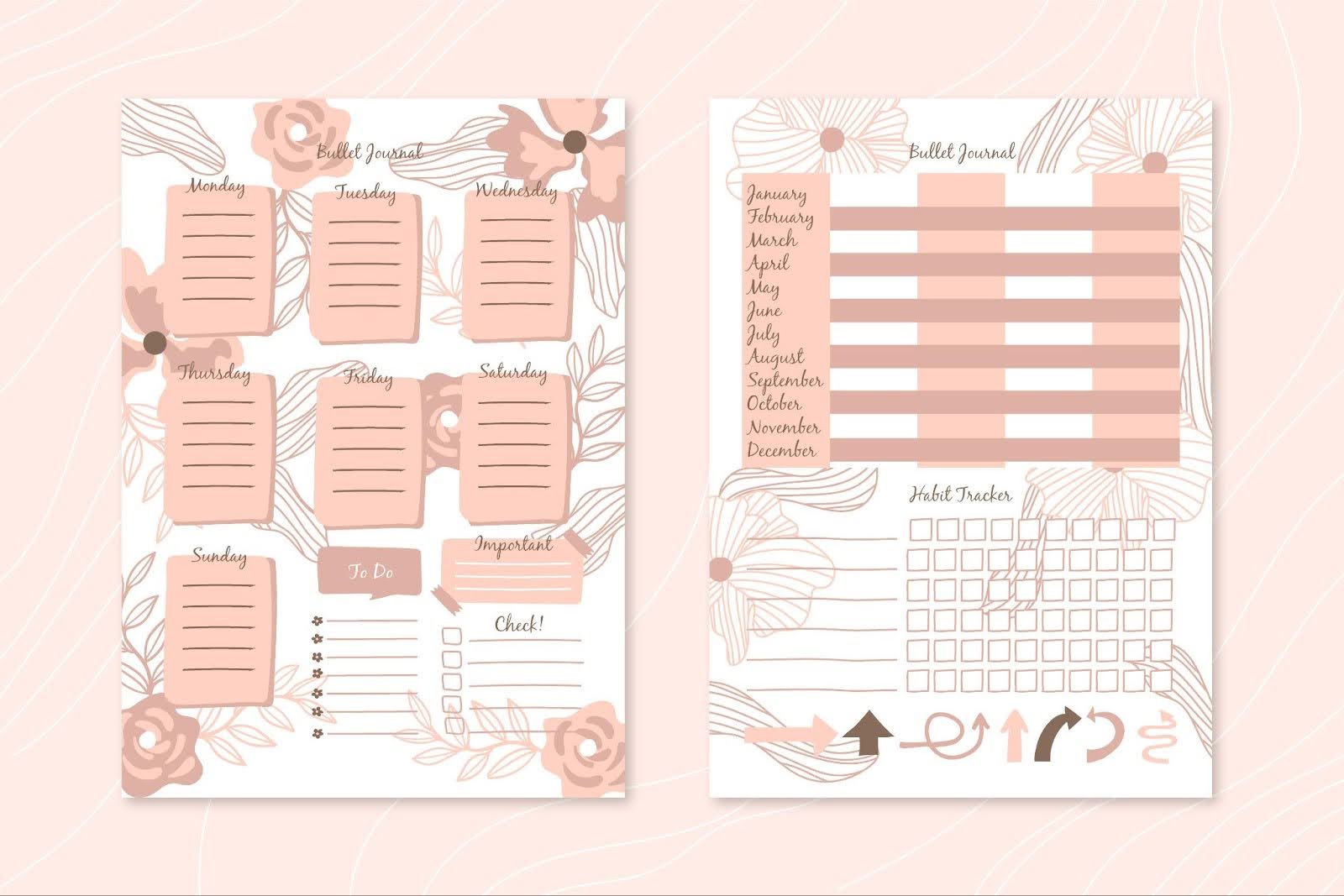
- Template Bundles (Planners & Printables): Digital planners, journal pages, or worksheet templates are in huge demand. A themed set of templates, for instance, a “small business kit” with invoice and business card or an ultimate life planner bundle with daily, weekly, and monthly planner pages. Productivity and organization printables are evergreen sellers, and offering a comprehensive pack makes your listing a one-stop solution. This is especially true since digital products continue to outperform traditional options.
- Font or Preset Bundles: If you create fonts or photo presets, bundling them can be very attractive to creators. Buyers often prefer grabbing a bundle of 20 fonts or a pack of Lightroom presets, rather than buying single files one by one. It’s a great way to upsell your catalogue of creative assets. Many top Etsy shops have sold 100,000+ preset and font bundles by packaging lots of styles together.
- Educational or Info Product Bundles: E-books, tutorials, or digital courses that are related can be sold as a bundle. For example, if you have recipe e-books, sell a collection of 5 cuisines as one bundle. Or a photography guide + posing cards + editing presets as a mega bundle for aspiring photographers. Educational content is a fast-growing digital product segment, and bundling multiple resources gives customers a fuller learning experience.
- “Mega” Bundles or Yearly Collections: Some sellers succeed by offering a giant bundle of all their designs in one listing at a premium price. For instance, a shop with 200 printable quotes might sell the entire collection as an “Ultimate Quotes Bundle”. These high-ticket bundles ($30–$100) attract serious buyers who want everything in one go, letting you raise order value while still giving them great value.
Think about your niche and customers – what group of related items would they find irresistible together?
Look at Etsy’s top-selling digital products in your category for inspiration. For example, if planner pages are popular, a bundle of multiple planner templates or stickers is a safe bet. Also consider seasonal or thematic bundles (like a “Christmas craft bundle” of various holiday SVGs).
Researching successful bundle listings will help you refine your ideas, but ultimately, success comes from finding your niche and choosing the right type of digital products.
For more guidance, check out our detailed guide on choosing the right digital product niche.
 Before investing time in creating a bundle, do some homework to validate that people want what you plan to offer. A bit of research up front can save you from making a bundle no one buys.
Here’s how to research effectively:
Browse Etsy for Similar Bundles
- Search keywords related to your idea and see what comes up.
- Identify the best-selling or “Popular now” listings that are bundled in your niche.
- Take note of what’s included, how many items, and at what price.
- Read the reviews and see what buyers love about them (or if there are any complaints you could improve on).
This will give you a benchmark for crafting a competitive bundle.
Analyze Keywords and Trends
Use Etsy-specific research tools (like Everbee or eRank) to gauge search volume for your product keywords. For example, how many people search for “digital planner bundle” or “SVG bundle”. High search volume with moderate competition is a sweet spot.
Learn From Shop Stats and Communities
If you’re already selling on Etsy, look at your shop data. Which of your individual products are frequently bought together by customers? Those could be prime candidates to bundle. You might notice people often buy your template and matching graphics in one session – a clue to package them. Also, engage in Etsy seller forums or social media groups. Sellers often discuss what’s selling well. As an example, many report that bundles of 4–7 designs sell better than single designs in the digital graphics category, confirming that bundling boosts sales.
The best bundles are built on real market data, not guesswork. Let proven demand shape your designs, and you’ll be far more likely to create a winning product. With a solid concept in place, the next step is bringing your bundle to life.

Creating a robust digital bundle might sound time-consuming. After all, you need multiple high-quality items instead of just one. But with the right tools, you can produce your bundle assets quickly without compromising quality.
Here’s a workflow to design bundle content efficiently:
- Start with What You Have: If you already have individual products or designs in your library, consider combining them into a new bundle. Many sellers simply repurpose existing content into value packs. For instance, if you have 10 separate clipart sets, you can bundle them as a mega pack. MyDesigns makes this easy. You can upload existing files to a new listing folder in one go. Just create a new listing and use the Upload Files to a Single Listing option to add multiple files at once.
- Generate New Designs with AI: Need more designs to round out your bundle? AI can give you a creative boost. With Dream AI on MyDesigns, you can generate unique art from text prompts in seconds — perfect for extra graphics, patterns, or variations. For instance, if you’re creating an animal illustration bundle, Dream AI can instantly produce new images in a matching style, giving you fresh content without extra effort.
To dive deeper into how Dream AI works, check out our introduction to Dream AI models.
- Customize and Refine with a Design Tool: While AI can generate a strong starting point, you’ll often want to tweak or brand your designs. MyDesigns includes a built-in Canvas editor, a drag-and-drop design tool where you can edit images, add text, or combine elements. This makes it easy to prepare final files or create different sizes. For example, you could take an AI-generated background and use Canvas to overlay quotes (turning it into a set of prints), or adjust colors so your bundle has a cohesive palette.
- Ensure High Resolution & Proper Formats: Double-check that each item in your bundle is high quality – at least 300 DPI for printables and in the appropriate format (PDF, PNG, SVG, etc.). MyDesigns provides handy image utilities like background removal and upscaling. Use them if needed to clean up images or scale dimensions without loss. For example, if you generated art at 1024×1024 px, you can upscale it for large print sizes. Taking the time to prep professional files pays off in customer reviews.
I covered this topic in detail in one of my videos.
 One of the beautiful aspects of digital bundles is that, once you have a successful formula, you can rinse and repeat to scale your shop quickly. Instead of one $5 item, you could have ten bundle listings at $15–$20 each, covering various themes or niches.
Many Etsy entrepreneurs find that increasing their number of listings leads to more overall sales – both by capturing more search traffic and by giving customers more options in your shop. In fact, Etsy’s own stats show the marketplace still has far more buyers than sellers, so more listings can mean a bigger slice of that buyer pie for you.
However, manually creating and managing dozens or hundreds of listings can be overwhelming if you try to do everything one by one. This is where platforms like MyDesigns are a lifesaver. MyDesigns was built to let e-commerce creators handle tasks in bulk with minimal effort, which is perfect for scaling up bundle offerings.
For example:
- Bulk Listing Creation: In MyDesigns, you can prepare listing templates and duplicate them easily. Say you want to launch 10 new bundles that are similar in structure (just different themes). Instead of starting from scratch each time, you can use a saved template for digital bundles and just swap out the files and keywords for each. MyDesigns even lets you auto-fill listing details in bulk.
- One-Click Bulk Publishing: When your listings are ready, MyDesigns Bulk Publish feature allows you to post multiple listings to Etsy (and other integrated platforms) with a single action. You could publish 20 bundle listings to your Etsy shop in a few seconds, whereas doing that natively would take many hours of repetitive work.
- Centralized Listing Management: As your product catalog grows, keeping track of everything is important. MyDesigns provides a Listing Management dashboard where you can organize items into folders (say, one for each bundle theme), update details in bulk, and even import existing Etsy listings.
- Multi-Channel Expansion: Why stop at Etsy? Bundling is a strategy that works just as well on other marketplaces or your own website. MyDesigns integrates with platforms like Shopify, WooCommerce, Amazon, and TikTok Shop, so you can take a successful Etsy bundle and publish it across channels with just a few clicks. Early adopters on TikTok Shop, for example, have reported conversion rates up to 4x higher than standard e-commerce. With MyDesigns’ Shops & Integrations, expanding your reach is straightforward — imagine your bundle selling on Etsy, your own site, and TikTok, all managed from one platform.
- Analytics and Optimization: Finally, once you’re scaling, use data to your advantage. Track which bundles are selling best and look for patterns. Maybe your “kids SVG bundle” sells twice as much as your “wedding SVG bundle” – that’s a cue to create more kids-focused products or to improve the wedding one. MyDesigns includes sales analytics dashboards to help you see revenues, order trends, and more. Over time, this helps you optimize your catalog by focusing on what works and iterating on what doesn’t. The most successful digital product sellers are very data-driven, identifying their best-sellers and doubling down. As the saying goes, “data is the new oil” – use your sales data to fuel smart decisions on what bundle to create next or how to price your items.
Scaling up can truly accelerate your earnings. With bulk workflows and AI automation, even a one-person business can manage a large Etsy shop with ease.
Many solopreneurs have grown their Etsy income significantly once they embraced these tools — from side hustlers making a few hundred dollars a month to entrepreneurs running six-figure digital product businesses.
The key is to systematize repetitive tasks like design creation, listing, and publishing. This frees you to focus on strategy and creativity.
MyDesigns is purpose-built for this: you can create, optimize, and publish in bulk, saving time to either expand your product catalog or market your shop.


Leave a Reply