

In my previous article, I covered how to set up an Etsy shop from scratch. In this article, I’ll cover how to create eye-catching designs for your digital products or print-on-demand shop, which is one of the most important aspects of a thriving business in this niches.
In my years of selling online and working with hundreds of successful Etsy sellers, I’ve seen firsthand how great designs can be the difference between a struggling shop and a flourishing one. Your designs need to grab attention, stand out, and most importantly, sell.
Although Etsy supports multiple product types, we’ll focus on digital and POD products in this article. These are perfect for Etsy sellers who want to avoid the complications of managing inventory. Digital products can be sold in the form of downloadable files, while POD products can be created and fulfilled by third-party services. This business model allows you to focus on creativity and sales without worrying about stock or shipping logistics.
Additionally, I’ll introduce you to some of the cutting-edge tools MyDesigns offers to help you create stunning designs in bulk, saving you time and effort. Let’s dive in.
Table of Contents
Why Focus on Digital and Print-on-Demand Products?
In my opinion, digital and print-on-demand products are two of the best categories for Etsy sellers, especially if you’re just starting out. Here’s why:
- No Inventory Headaches: With these products, you don’t need to worry about storing or shipping inventory. For digital products, once a customer purchases, they can download the files instantly. Print-on-demand products are produced only when an order is placed, which keeps your costs low and your business flexible.
- Low Startup Costs: Since you don’t need to purchase bulk inventory, your upfront costs are minimal. I strongly advise you to leverage this advantage, especially when testing out new product ideas.
- Scalability: Both digital and POD products are scalable, meaning you can add new designs and offerings with relative ease. This allows you to grow your shop without dramatically increasing your workload.
With the right designs, both digital and POD products can become top sellers. In my experience, the key is to create designs that resonate with your target audience and are optimized for Etsy’s search algorithm.
Designing for Digital Products
Popular digital product categories include printable wall art, planners, invitations, and other downloadable templates. In my opinion, the best digital products are not only aesthetically pleasing but also offer practical value to the buyer.
Here are a few tips to keep in mind when designing digital products:
- Follow Trends, But Stay Original: I strongly encourage you to research current design trends to understand what your target audience is looking for. Whether it’s minimalist wall art or vibrant planner templates, staying on trend will help your products stand out. However, don’t just replicate what’s popular—bring your unique perspective to the table.
- High Resolution is Non-Negotiable: Ensure your digital products are high-resolution (300 DPI or higher). Low-quality files can lead to poor print results for customers, which may hurt your shop’s reputation.
- Create Versatile Designs: I’ve seen that the most successful digital sellers create designs that are versatile and can appeal to a broad audience. A single printable artwork, for instance, could fit into home offices, living rooms, or even as a gift item.
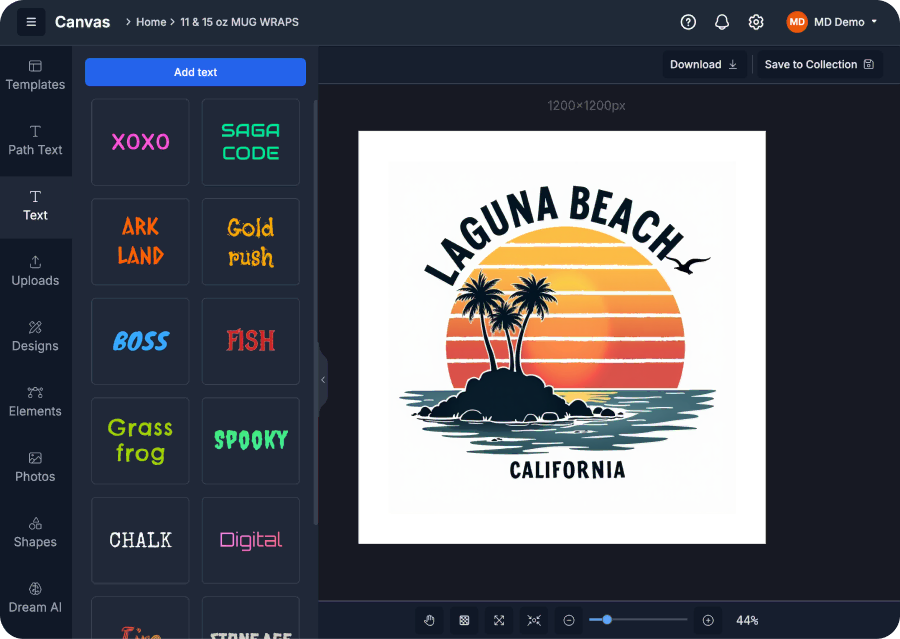
If you’re looking to streamline your design process, MyDesigns’ Canvas tool is a fantastic solution. It’s a simple drag-and-drop editor that allows you to create digital designs with ease, even if you’re not a professional designer. Canvas comes equipped with pre-built elements like fonts, shapes, and stock images, so you can bring your ideas to life quickly and efficiently.
Designing for Print-on-Demand Products
Print-on-demand offers a fantastic way to sell physical products like t-shirts, mugs, phone cases, and home décor without needing to handle inventory. As an Etsy seller, POD allows you to focus on the design aspect while third-party providers handle production and fulfillment.
To create POD designs that sell, I strongly recommend the following:
- Know Your Audience: This is a critical step that too many sellers overlook. I’ve worked with sellers who’ve achieved significant success by honing in on niche markets, whether it’s cat lovers, gamers, or fitness enthusiasts. Your designs should cater specifically to the interests of your target audience.
- Keep It Simple, But Effective: In my experience, simple designs often outperform overly complicated ones, especially on products like t-shirts and mugs. Think bold text, clear imagery, and striking color contrasts. These designs are not only more visually appealing but also print better on various product types.
- Consider the Product Fit: A design that looks great on a t-shirt might not translate well to a phone case. I advise you to tailor your designs to fit each product type to ensure the highest quality output.
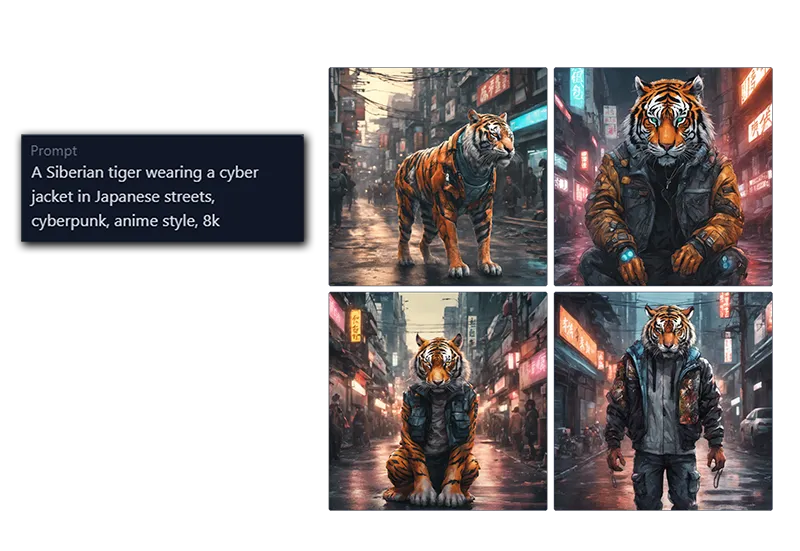
If you want to take your POD designs to the next level, MyDesigns’ Dream AI tool is a game-changer. With Dream AI, you can generate high-quality designs using text or image prompts. The AI draws from a wide range of models such as DALL-E 3, SDXL, Ideogram, and SD3, allowing you to experiment with different styles like Cinematic, Photographic, or Fantasy Art. This is a powerful way to stay on trend and produce a large volume of designs quickly.
How MyDesigns Can Help You Scale Your Design Process
In my opinion, one of the biggest challenges Etsy sellers face is cost and time management. When you’re creating designs, optimizing listings, and managing customer service all at once, it’s easy to get overwhelmed. That’s where MyDesigns comes in. With tools like Dream AI and Canvas, you can create high-quality designs in bulk, significantly cutting down on the time it takes to get your products live.
- Dream AI: This tool allows you to generate stunning, AI-driven designs based on prompts you provide. Whether you’re looking for intricate designs for t-shirts or minimalistic digital prints, Dream AI gives you endless creative possibilities. It’s like having a personal design assistant who never tires.
- Canvas: Our drag-and-drop editor makes it easy for anyone—regardless of design experience—to create professional, polished designs. Use pre-built elements or upload your own to craft custom designs that resonate with your audience.
With these tools, you’ll not only save time but also increase your output, enabling you to scale your shop and test new design ideas quickly.
MyDesigns also allows you to edit listings in bulk (such as applying image effects), generate image and video mockups and automatically create titles, tags and descriptions for your listings in bulk.
Final Thoughts
Creating eye-catching designs that sell is essential for any successful Etsy shop. Whether you’re focusing on digital products or print-on-demand items, I strongly advise you to invest time in understanding your audience, staying on trend, and leveraging the right tools. With MyDesigns, you can streamline your design process and bring your creative vision to life more efficiently.
In the next article, How to Optimize Your Etsy Listings for Search (Part 4 of 6), we’ll explore how to make sure your listings are seen by the right audience through effective Etsy SEO strategies. I’m looking forward to sharing my insights with you on how to rank higher in search and drive more traffic to your shop.
With the right designs and the right tools, there’s no limit to what you can achieve on Etsy.
Leave a Reply